

Inferred Measurements
By Daniel Samson · 2026-10-31
Here comes the fun part!
After spending weeks researching LLMs, downloading models from hugging face, and buying a nVidia Tesla v100 32GB card. I can finally test what is real and what is nonsense.
The science of measuring
With Llama.cpp's built-in server as the inference engine - the part that runs the model. It just so happens, that its API provides a /metrics endpoint that is compatible with Prometheus. When you combine that with Grafana, you get detailed metrics on how the model is actually performing.
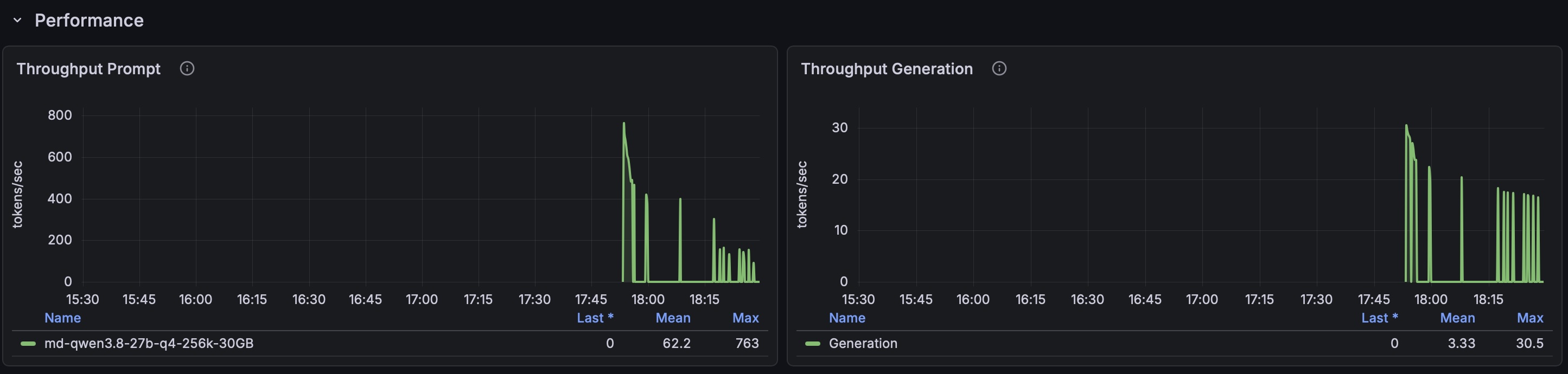
You see, you cannot trust the statistics coming from the harness. Most harnesses only display half of the picture: The maximum generation tokens per second.
I want the full picture!
The Benchmarks
I devised two benchmarks of my own, instead of relying on the "trust me bro" benchmarks such as Terminus and SWE Pro.
Models + Harness
I chose 3 sizes: tiny, small and medium:
Qwen 3.5 0.8B (Tiny) | Qwen 3.5 9B (Small) | Qwen 3.8 27 B (Medium) | |
|---|---|---|---|
Harness | Pi | Pi | Pi |
GPU Memory Usage | 4GB | 16GB | 30GB |
Parameters | 0.8 Billion | 9 Billion | 27 Billion |
Context | 256K | 256K | 256K |
Quantization | Q8_0 | Q4_K_M | Q4_K_M |
KV Cache Quantization | Q8_0 | F16 | F16 |
Caution! A small local model is not the same as a small cloud model. The small cloud models are much closer to a trillion parameters. Which is way beyhond my GPU budget!
Brave Web Search
I wanted to find out how well my card performs on an easy task. So I devised a task to simply use the Brave MPC to search "What is the population of Edinburgh in 2026".
Qwen 3.5 0.8B (Tiny) | Qwen 3.5 9B (Small) | Qwen 3.8 27 B (Medium) | |
|---|---|---|---|
Time to completion | 30 seconds | 18 seconds | 37 Seconds |
Max Prompt Throughput | 10100 Tokens / Second | 2270 Tokens / Second | 775 Tokens / Second |
Max Generation Throughput | 192 Tokens / Second | 85.0 Tokens / Second | 30.5 Tokens / Second |
The results clearly demonstrate that my 2018 GPU can really pack a punch for its price range. The time to completion might have more to do with the balance between load times, and the reasoning capability of each model. I also ran this against Claude code Haiku 5.5. It finished the task in just 5 seconds.
Making a news application
Now for the real test. How well can a local model build a fully featured news website? I didn't just want to see the models "one-shot" a website. I wanted to see it work in a real environment.
![FireShot Capture 005 - newzy — Your news, curated - [localhost].png](/api/files/e4fe62cb-afa4-4613-a30a-4136bbf5a902.png)
So I broke the tasks down into detailed Markdown files and called them milestones. Each milestone contained a prompt, a description, acceptance criteria, technical notes, and QA notes. Then I made a sister document for scoring each milestone.
During my benchmark, i started a new session before running each milestones:
Setup up a git project
Setup the backend
Setup the frontend
Setup the developers environment
Add authentication feature e.g. sign in, register, forgotten password...
Add admin feature to manage the news articles.
This was to see how well the model reasons about the current state of the codebase, and demonstrate its systems thinking capability. In real-world tasks, you often come back to a codebase, without the full context, and have to figure out what to do.
Time to completion
It was no surprise, that the small model was quicker. This is because it needs less memory bandwidth. Don't be fooled! the small model also produced terrible results. The small model, simply does not have the reasoning capability. This is why i didn't include the tiny model. That model is only good for basic web searching. It can barely make a tool call.
Qwen 3.5 9B (Small) | Qwen 3.8 27 B (Medium) | |
|---|---|---|
m1-setup-git-project | 2 Minutes 47 Seconds | 5 Minutes 29 Seconds |
m2-setup-backend | 2 Minutes 15 Seconds | 20 Minutes 46 Seconds |
m3-setup-frontend | 2 Minutes 47 Seconds | 1 Hour 27 Seconds |
m4-setup-developer-environment | 7 Minutes 35 Seconds | 18 Minutes 22 Seconds |
m5-setup-authentication | 5 Minutes 58 Seconds | 1 hour 18 Minutes |
m6-setup-admin-area | 14 Minutes 47 Seconds | 3 hours (I intervened to fix a test the model was stuck on) |
Total | ~ 35 mins | ~ 6 hours |
Throughput
This is what every social media influencer goes on about.
Personally, I prefer the actual time to completion over this metric.
The "Prompt" measures how fast the model reads the input tokens from the prompt, skills and context window.
The "Generation" measures how fast the model outputs tokens. So when your harness tells you 30 TPS, that is the maximum number of tokens the model outputted in a second. However, your harness only measures the last sequence of output tokens, not the whole task.
These figures measure across each milestone:
Qwen 3.5 9B (Small) | Qwen 3.8 27 B (Medium) | |
|---|---|---|
Mean Prompt Throughput | 330 - 778 Tokens / Second | 33.7 - 116 Tokens / Second |
Max Prompt Throughput | 1,500 - 2,170 Tokens / Second | 480 - 759 Tokens / Second |
Mean Generation Throughput | 42.8 - 74.3 Tokens / Second | 2.76 - 13.9 Tokens / Second |
Max Generation Throughput | 67 - 84.6 Tokens / Second | 29.5 - 30.6 Tokens / Second |
Quality
Honestly, the quality difference was night and day.
Qwen 3.5 mostly produced unusable work. It had too many hardcoded values that didn't match up. It was like a death by a thousand paper cuts.
Qwen 3.8 was a completely different story. It was good at double-checking its work by running the different test suites. It detected the major bugs it created and fixed them. It still produced bugs, but they were mostly edge case issues. With a few more hours of prompting, it would be very easy to fix those.
Qwen 3.5 9B (Small) | Qwen 3.8 27 B (Medium) | |
|---|---|---|
m1-setup-git-project | 6 / 9 points | 7 / 9 points |
m2-setup-backend | 17 / 25 points | 24 / 25 points |
m3-setup-frontend | 24 / 49 points | 35 / 49 points |
m4-setup-developer-environment | 13 / 29 points | 17 / 29 points |
m5-setup-authentication | 31 / 46 points | 44 / 46 points |
m6-setup-admin-area | 24 / 51 points | 45 / 51 points |
% Points Achieved | 55.02 % | 82.29 % |
![FireShot Capture 007 - newzy — Your news, curated - [localhost].png](/api/files/878410d3-7b54-42cd-8e91-603129d3580a.png)
My System
Here are my system specs for you detailed oriented types:
Component | Specification |
CPU | Intel Core i7-11700K |
Architecture | 11th Gen Rocket Lake |
Socket | LGA 1200 |
Cores / Threads | 8 cores / 16 threads |
Base Clock | 3.6 GHz |
Max Turbo | 5.0 GHz |
RAM | 64 GB DDR4 |
GPU | NVIDIA Tesla V100 32 GB PCIe |
Storage | 2 TB NVMe SSD |
Operating System | Arch Linux |
Power Supply | 850 watts |
Conclusion
I wouldn't give up cloud models just yet!
Local models are great for narrow intelligence applications, such as monitoring your infrastructure and sending helpful messages. Though the local cost compared to a cloud subscription is a compelling argument. The one thing you don't hear from social media, is the time to completion. Which is the most important metric in real business applications - time is money!
Unfortunately, you can't just replace GPT 6 Astra or Claude Fable with your consumer GPU. These models run on massive data centres for a reason. Cloud models are an order of magnitude faster compared to local models. They are way better at reasoning. You can waste several days with a local model, when a cloud model will solve the same problem in an hour.
Provided that you don't mind leaving a local model running for several hours, it might make a lot of sense to use them.
Still. I want to continue to learn how to train a small model to manage my Kubernetes cluster of Raspberry PIs. So I can know how to implement AI for narrow intelligence applications.
I think I will keep playing with my inference card 😉